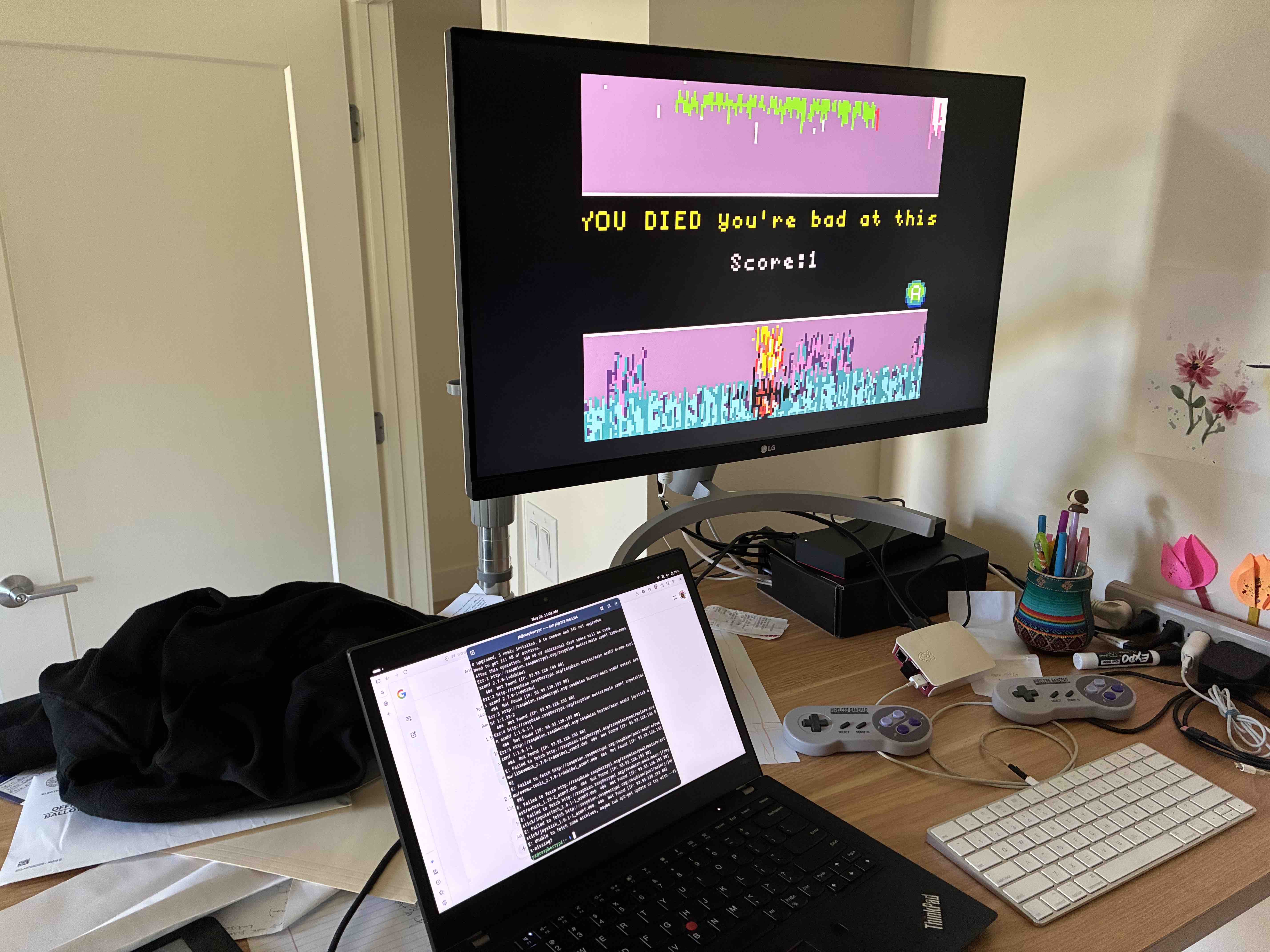
My son has been building a game called MONKEY MADNESS GHOULS GHOSTS (beats the initial working name of "w/ dad copy") on Makecode Arcade. If you’re not familiar with the platform, it’s a block based programming environment for building 8-bit pixel-y handheld games. The drag-and-drop blocks largely solves syntax error frustrations, but it has real programming challenges like events, loops, arrays, conditionals, and more. There are guided tutorials to teach computer science concepts, but it’s also approachable enough to trial and error. There’s a library of sprites and sounds, and extensions add additional blocks and components. There are many pre-built games to “view source” to modify and tinker and bring in elements to your own game.
While you're making the game, you can play it in an emulator in the browser. The game can also be downloaded to a physical handheld device. A friend gave us an Adafruit device with a small screen and controls, but unfortunately we lost it years ago and it hasn’t turned up since. We do have a Raspberry Pi connected to the TV for playing old roms like Kirby Superstar and Teenage Mutant Ninja Turtles. So what if we could play MMGG on the TV with some controllers?
https://github.com/Vegz78/McAirpos promises exactly this. It was quick to setup and got me 90% of the way. But the default key mapper did not work for our specific controllers. The project does not use the default mappings provided by retropie / emulation station. X was A, and A was B. That wasn’t a big deal, but tapping Left causes Right to be held down. There was also no way to quit the game.
TL;DR on what fixed it for me:
launCharc [nomap] [verbose]
arcade1.py AND arcade2.py with correct codesI plugged my pi into a monitor and keyboard, but also found it helpful to have an ssh session when stuff froze to kill and reboot things. The retro pie system menu shows the IP, and the default username/password is pi/raspberry.
$ ssh pi@192.168.1.114 # default password is raspberry
The first challenge was figuring out which codes were being recognized when the controller buttons were pressed. I tried to install evtest, but turns out my raspian buster distribution was released 9 years ago, and the sources file were 404-ing. I didn’t get sidetracked into reading why the urls were changed, but for a retro gaming distribution that rarely needs updates, I wish the project had maintained backwards compatibility.
# /etc/apt/sources.list
deb https://legacy.raspbian.org/raspbian buster main contrib non-free rpi

$ sudo apt-get update
$ sudo apt-get install -y evtest  # jstest was also helpful

$ ls -l /dev/input/by-id  # list input numbers with friendly names
$ evtest /dev/input/event0  # the physical controller
$ evtest /dev/input/event3  # the virtual map created by McAirpos. Your number will be different. Mine were 0, 1 controllers, 2 keyboard
evtest was reporting that my controller supports EV_KEY codes, and in retrospect, I think the correct way would’ve been to modify /sd/arcade.cfg and run launCharc with the nomap option. I didn’t understand the difference between EV_KEY and EV_ABS the first time, so I went straight to modifying McAirpos/uinput-mapper/configs/arcade1.py. This didn’t have any effect and I couldn’t tell whether I was configuring things wrong, or if the config was not read at all. Adding the verbose flag and manually starting launCharc without emulationstation isolated issues and made it faster to retry changes.
# exist emulationstation with controllers or kill
$ launCharc verbose ~/path/to.elf
Killing and starting just the launCharc process from an ssh session was sufficient to pick up changes without rebooting the pi or quitting emulation station. The verbose flag also tipped me off that it was reading from arcade2.py when I had been editing arcade1.py.
To fix the direction keys:
# from evtest. 0 is left, 1 is rest, and 2 is right
autoCalibrateOn = False
min1 = 0
max1 = 2
To make ‘Start’ key exit the game, evtest told me BTN_TR2 was start. There’s a bit of a lag to wait for the launCharc process to quit before returning to emulationstation, but it works fine.
BTN_TR2: {
  ‘type’: (0, EV_KEY),
  ‘code’: 1,
  ‘value’: None
},
Finally I edited the correspond key codes of A, B with outputs evtest to match. Finally, I copied arcade1.py to arcade2.py:
# make sure you’re editing the right file. See which one when you `launCharc verbose …`
$ cp ~/McAirpos/McAirpos/uinput-mapper/configs/arcade{1,2}.py
Big shoutout to Vegz78 for maintaining this project!